AlipayHK Cross-border Payment Guide: Pay Across Chinese Mainland, Japan, Korea and More with One App
Whether you’re heading north for a weekend or flying to Japan or Korea, having the right payment tool ready makes your trip smoother. As Hong Kong’s leading e-wallet, AlipayHK does more than just pay the local bills and handle everyday expenses; it extends its services across borders. This guide covers practical tips for paying in China, Japan and Korea, how to top up your wallet, and use its handy in-app features一so you can enjoy a seamless, one-stop cross-border journey.
No Upfront Currency Exchange, Settle in HKD with 0% Fees*
Hongkongers are heading north and travelling abroad more than ever一weekend drinks in Shenzhen, food hunts in Guangzhou, or shopping trips in Japan and Korea. The Hong Kong version of Alipay on your phone, AlipayHK, ensures these cross-border payments are completely hassle-free! It’s accepted by millions of merchants across the Chinese mainland and connects seamlessly to payment networks in Japan and Korea. There’s no need to exchange cash in advance一pay in HKD at real-time preferential FX rates, with 0% cross-border fees on selected payment methods*. Earn A. Point on eligible transactions and combine them with in-app vouchers and instant discounts for smarter value on every trip!
*Rates and fees are as shown in the app; applicable to selected payment methods.

Download and Register AlipayHK
Step 1: Download the AlipayHK App
Get the official app from:
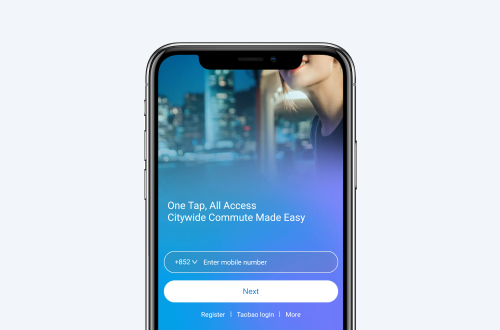
Step 2: AlipayHK Account Registration
-
Sign up with a Hong Kong mobile number: enter a valid number to receive an SMS code for verification.
-
Provide basic details: ID upload isn’t required at sign‑up; however, it is highly recommended to complete the identity verification to unlock more features (e.g., paying cross‑border with balance, higher limits).
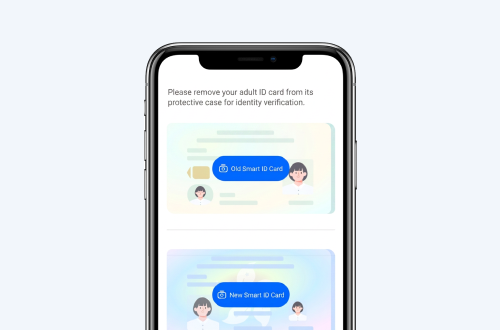
Step 3: Complete Identity Verification (Unlock Full Features)
In line with regulatory requirements, completing KYC enables additional features and higher payment limits, such as the ability to use the Transport Code or to spend in the Chinese mainland. We recommend verifying early to avoid failed payments overseas due to limits.
*Note: Features, limits and terms are subject to the app and the actual payment page.
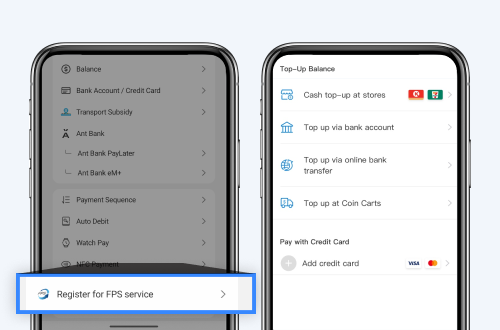
How to Top Up AlipayHK?
Get your funding source ready before you go, so cross-border payments stay seamless. You can top up your AlipayHK account with the following 3 methods, including debiting from your bank account or credit card:
Method 1: FPS Top-up (Instant)
Copy your wallet’s dedicated FPS ID from the account page, then use any Hong Kong bank’s mobile app to transfer funds instantly to your AlipayHK balance via FPS. It’s the most direct and fastest way to top up.
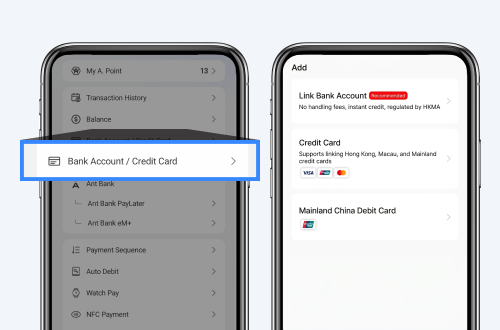
Method 2: Link a Hong Kong Bank Account
Go to “Me” > “Bank Accounts/Credit Cards” to add and link your Hong Kong bank account. Once linked, the system can make automatic debits or instant transfers when you pay一no repeated manual top-ups needed.
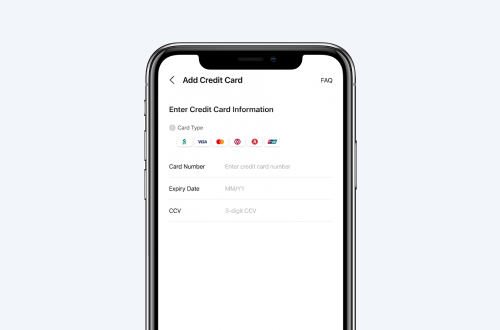
Method 3: Link a Credit Card
You can also link your frequently used credit card. Paying with a linked card lets you continue earning your card issuer’s native rewards, such as air miles, cash rebates, or spending points.
Can I Link an Overseas Credit Card?
Yes. AlipayHK supports eligible cards issued outside Hong Kong (e.g., Visa/Mastercard). You can link them in the app for everyday spending and cross-border payments. Availability, limits and features may vary by issuer and are subject to the latest information shown in the app.
Top-up Limits and Fees
Top-up limits depend on your verification level. AlipayHK does not charge additional transaction fees for cross-border payments themselves; however, depending on your chosen top-up or debit method, related institutions (such as your card issuer or bank) may charge fees for transactions, FX conversion, or cash advances. Actual fees, availability and limits are subject to your issuer/bank and the latest details shown in the app.

How to Use AlipayHK When Traveling to Chinese Mainland
Once your balance is ready or your payment methods are linked, look for the “Alipay/Alipay+” logo in store and follow these steps to pay in the Chinese mainland.
Step 1: Look for the “Alipay/Alipay+” Logo
In Shenzhen, Guangzhou and beyond一whether at shopping centers, street stalls, bubble tea shops, ride-hailing, food delivery or power-bank rentals一any outlet displaying the “Alipay” or “Alipay+” logo accepts payment.
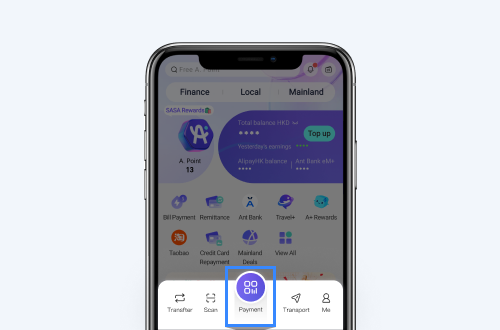
Step 2: Open Your Payment Code on the Home Tab
When it’s time to pay, open the AlipayHK App and tap “Payment” on Home to display your Payment Code.
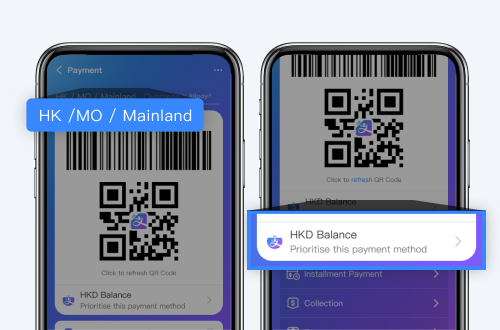
Step 3: Choose a Payment Method
On the Payment Code screen, switch your funding source as needed: wallet balance, linked Hong Kong bank accounts, or credit card.
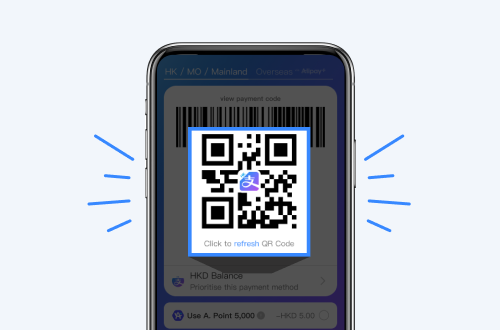
Step 4: Show Your Code or Scan the Merchant’s Code
Present your Payment Code for the cashier to scan, or tap “Scan” to read the merchant’s QR. Enter the amount if prompted and confirm to complete payment. Where applicable, you’ll earn A. Point on the transaction.
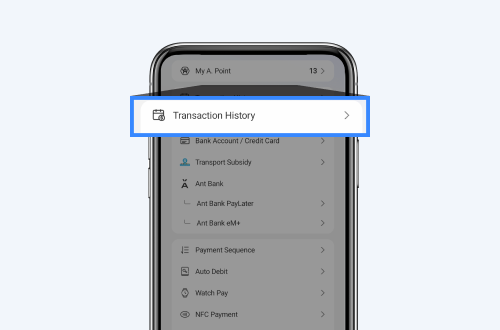
Check Your Transactions Anytime
After payment, the details are updated instantly. Go to Home > “Me” > “Transaction History” to view each bill’s HKD settlement amount and real-time FX rate.
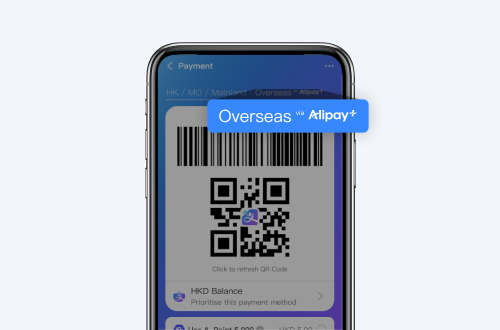
Using AlipayHK Overseas
Select “Overseas via Alipay+” on the “Payment Code” Screen
Beyond spending in China, AlipayHK also works in a number of overseas locations. On the Payment Code screen, tap “Overseas via Alipay+” to switch to an overseas QR code. You can then pay at networks that support Alipay+ (for example, PayPay in Japan and ZeroPay in Korea). Availability and participating merchants are subject to the latest details shown in the app.
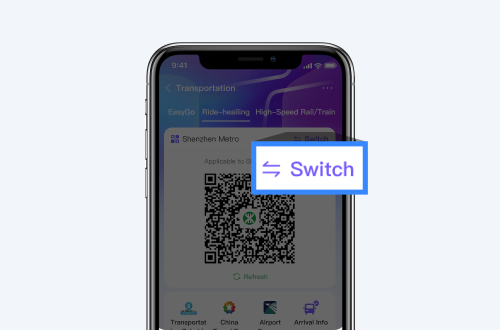
Cross-border Travel
Beyond shopping and spending, AlipayHK helps you travel across the border with ease.
Cross-border Transport Code
Open the AlipayHK “Transport” tab to access “Transport Code”. Tap “Switch” and choose your destination city. Scan to enter/exit the metro and selected buses一no separate transport card needed. Fares are settled instantly via your chosen funding source.
Pro Tip: Due to regulatory and account-security requirements, HKID scan and selfie verification (Verified Account) are required. Availability and routes are subject to the latest details shown in the app.
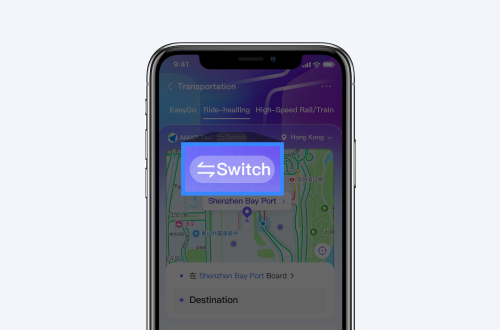
Cross-border Ride-hailing
Ride hassle-free across 46 countries! AlipayHK now links directly with top global platforms like DiDi, Amap, Grab and more. Go to Home > Transport > Ride‑hailing, switch location and choose a platform to book services available locally. Settlement is in HKD where applicable. Coverage and availability follow the latest details shown in the app.